

  • Platform

    Overview →
    Digital Asset ManagementCentralize, organize, and share media assets. MedienweltCustom DAM interfaces for your workflows. Video Asset ManagementManage, approve, and publish video assets. EnterpriseDAM for complex teams and global structures. IntegrationsConnect Adobe, Microsoft, Figma, TYPO3, and more.

    Workflow tools

    CollaborationToolSpeed up feedback and approvals. Desktop synchronizationKeep files synchronized locally and in the cloud. Media libraryMedia portals for internal and external audiences. MediaKitShare selected media through one link.

    Popular

    • Features
    • Prices
    • Test account
    More tools
    • PressArea
    Why AdmiralCloud? DAM, VAM, and distribution in one platform.
    Book demo Start test account
  • Features
  • Prices
  • Industries

    HealthcareMedia for hospitals and health insurers. AgenciesCoordinate media for clients and projects. EducationMedia for teaching, research and communications. AutomotiveMedia for vehicles, brands and sales. IndustryAssets for production and communications. EnergyVideo workflows at Vattenfall. InsuranceOrganize media for distributed teams.
    Other industries →

    Company size

    Large corporationsConnect teams across locations. SMEsOne place for your team's media.

    For your team

    • Marketing Explore media workflows and features.
    • Customer Success Onboarding, training and ongoing support.
    Find the right DAM solution

    Discuss your requirements with our team.

    Book a live demo
    Book demo View all industries
  • Knowledge & security

    Trust CenterSecurity, compliance, availability, and accessibility. AI generated assetsHow DAM platforms help label AI-generated assets. Customer SuccessGuidance for rollout and adoption. Know-howInsights on DAM, media, and workflows.

    Downloads

    • Requirements catalog
    • DAM guide
    In practice Video workflows at Vattenfall How a global company organizes its video content. Read the customer story
    Go to know-how All resources
  • AdmiralCloud

    ContactTalk directly with our team. About usMeet our team, mindset, and story. JobsExplore open roles at AdmiralCloud. DAM test winnerAwards and comparison results.

    Quick contact

    Questions about DAM?

    We show which setup fits your assets, teams, and approvals.

    Contact our team
    Contact us Book demo
Book demo Login DE
Book demo Login DE

Digital Media Metadata Handling – Upping the Value of Assets

Metadata have a great deal to offer and your company can benefit from this when structuring its digital media. The addition of metadata turns your digital media into an asset, i.e. an object of value, that can be retrieved and used again and again. Metadata are additional pieces of information that place an image or video in a specific context. Depending on the type of digital media, this information can include author, sources, keywords or contacts.

Custom metadata fields

Metadata tailored to each image type.

Define a metadata set for each subtype, with the fields your team needs for products or people.

A precision milling cutter on a workshop table.

Image / Product

Precision milling cutter

milling-cutter.jpg

File information · same fields for both types

Format
JPEG
Dimensions
1536 × 1024 px
Colour space
sRGB

Product metadata

Custom fields
Article number
FR-240
Product name
End mill
Product group
Milling tools
Series
Precision
Material
Carbide
Diameter
12 mm
View
Three-quarter view
Intended use
Product catalogue

Keywords

  • Product photo
  • Milling
  • Catalogue
Portrait of a fictional development engineer in a bright workshop.

Image / Portrait

Lea Hoffmann

lea-hoffmann.jpg

File information · same fields for both types

Format
JPEG
Dimensions
1536 × 1024 px
Colour space
sRGB

Portrait metadata

Custom fields
Name
Lea Hoffmann
Role
Development engineer
Department
Product development
Location
Bremen
Organisation
Werkzeugbau Nord
Portrait type
Employee portrait
Photo credit
Studio Nord
Intended use
Company website

Keywords

  • Portrait
  • Development
  • Team
Illustrative records with fictional information. Custom fields are configured separately for each subtype.
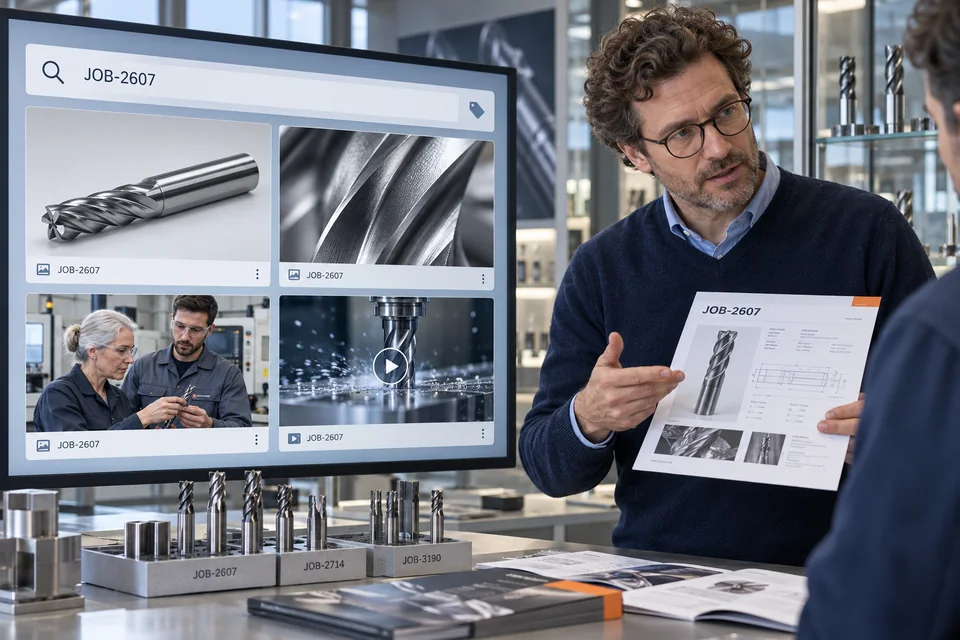
Illustration: A job number brings together product photos, close-ups and a video.

Metadata in a DAM uses targeted searches to save on effort

Digital asset management (DAM) is an effective tool for quickly and easily reading metadata from digital media. Compared to manually reading metadata, working with a DAM system saves you significant time and effort.

In a DAM system, digital media are instantly available and can be specifically searched for metadata. Campaign or project materials can be collated in a highly efficient way, thus offering a clearer overview.

Contact Us

Metadata – easily readable with AdmiralCloud

Companies have huge individual potential in their digital images and videos. Why not unlock this potential? AdmiralCloud’s DAM offers solutions for making effective use of your assets.

Take advantage of what AdmiralCloud has to offer for your business:

  • Captures all types of media quickly and precisely by automatically reading metadata
  • Increases your media’s value as you can define your own metadata, e.g. project names, job numbers or project-relevant information
  • Offers media-specific fields for metadata as images, videos and audio clips all have their own respective features
  • Restructures and optimizes your company processes sustainably through the strategic use of metadata

To save time and to fill in metadata effectively, AdmiralCloud also offers batch processing, meaning that a great deal of metadata can be added to your media in just a few clicks.
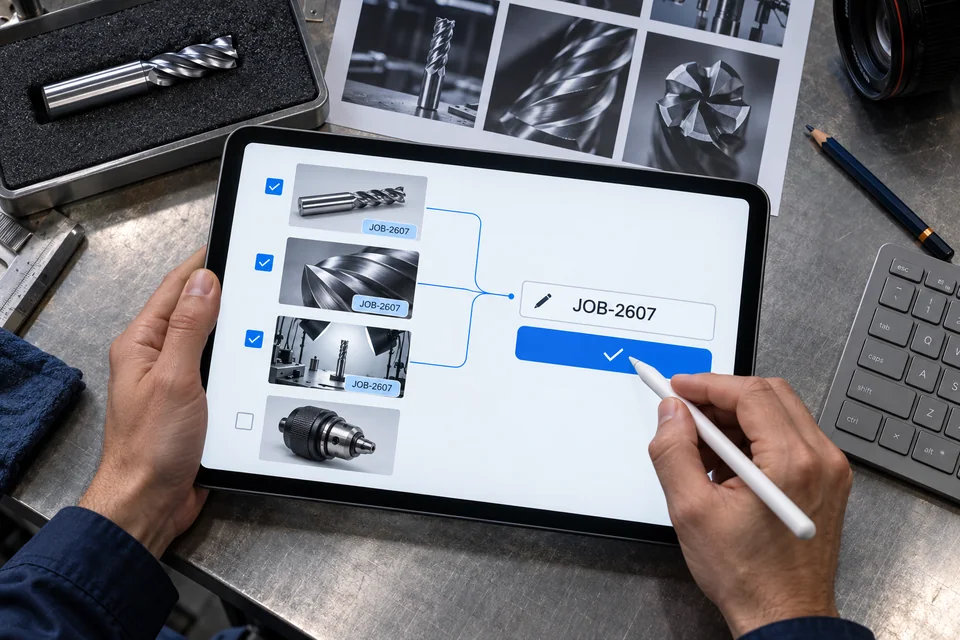
Illustration: Three selected assets receive the same job number while an unselected asset remains unchanged.
See Features
AC

Your choice

Privacy settings

With your consent, we use Google Analytics to measure website use, Google Ads to measure advertising, Leadinfo to identify company visits and HubSpot for marketing, forms and appointment calendars. Google Tag Manager manages Google tags. These services may use cookies and transfer data to the USA.

“Accept all” also loads HubSpot embeds automatically. With “Necessary only”, optional services stay off; you can still allow an individual form or calendar. You can change or withdraw your choice at any time via “Privacy settings” in the footer.

Privacy policy and service details

“Necessary only” reloads this page and other open pages with loaded services to stop them. Unsubmitted form entries will be lost.

Company

  • Trust Center
  • Software accessibility
  • About us
  • Jobs
  • Contact

Services

  • Features
  • Integrations
  • DAM Test Winner

Support

  • System Status
  • Customer Success
  • Knowhow
  • Book demo

Legal

  • Security
  • Our privacy standard
  • Privacy Policy
  • Privacy settings
  • Legal notice
f in
© 2026 AdmiralCloud AG